Design system structures
 josh.ferrell10min
One of the problems that is frequently run into when it comes to design systems is folks will always detach. This means that they saw a component that was built that had all this functionality, but there was something missing or some style that was missing that didn’t quite capture all their needs. When this happens that designer or developer will usually go off and build their own thing. In many cases, this, though well intentioned usually, can lead to poor results. Their use case may be covered now, but there are many things under the hood in a design system that those teams are thinking about that the person who built their own thing didn’t think about. Accessibility is a big gap that is usually missed in these detachments.
Design systems should not be fully restrictive. They should empower developers and designers to build even better than they could on their own. In order to support unique use cases, components are structured in a particular way which allows for flexibility, but restriction in key areas in order to provide the polish that is needed in a design system component.
Components are built upon three key building blocks:
- Behaviors - Self contained pieces of functionality that are composable
- Example: Downshift, Floating-UI, pragmatic-drag-and-drop
- Primitives - Unstyled components that are composed of behaviors
- Example: Radix, Base-UI, HeadlessUI
- Styled Components - Primitives styled with good defaults. Certain options that may be exposed in a primitive are not exposed when using this component
- Example: Slab, Cobalt, Primer
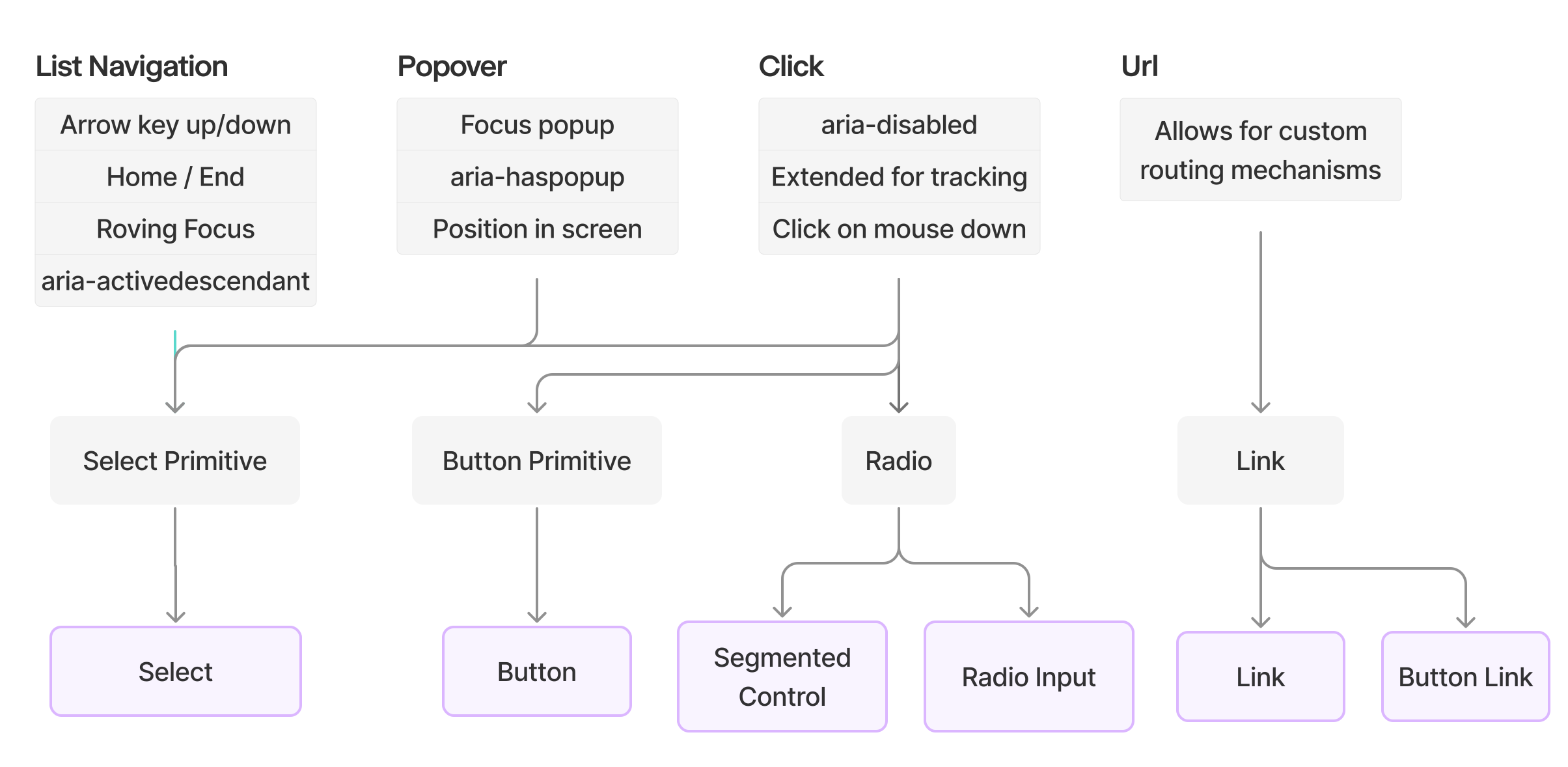
Behaviors
A behavior is a core piece of functionality that can be used by many different primitives. Primitives can also use many different behaviors as they should be composable. An example of a behavior is useListNavigation this is a hook which should provide the needed functionality to manage arrow navigation in a single dimension, either horizontal or vertical. This behavior would also provide the needed aria props for marking if something is currently highlighted if being used in an autocomplete box, or roving focus if used in a select dropdown.
const { getContainerProps, getItemProps } = useListNavigation({
	rovingFocus: true
})

return (
	<ul {...getContainerProps()}>
		{items.map(x => (
			<li {...getItemProps()}>{x}</li>
		)}
	</ul>
)
It’s very important for get methods for behaviors to be chainable as in many cases it’s highly likely that a primitive may have multiple behaviors. For instance, a component like select needs positioning and list navigation.
const popover = usePopover()
const listNav = useListNavigation()

const containerProps = pipe(
	popover.getContainerProps,
	listNav.getContainerProps
)

<ul {...containerProps()}>
Building from scratch isn’t always better
In many cases, libraries exist that implement behaviors in really great ways. For instance, it doesn’t make sense to rebuild pragmatic drag and drop, the library provides great abstractions of HTML5 drag and drop, is lightweight, and is composable. Instead, behaviors should be an abstraction of the library if it is sufficiently light-weight and performant. However, sometimes building something from scratch can be better, for instance, floating-ui ships list navigation but abstracts it and does not implement all functionality of list navigation.
Testing
Each behavior should have a suite of tests for it using a template formatting. This will allow components that compose with it to not duplicate test logic and instead compose tests from behaviors that they consume and then add on additional tests that are unique to that particular component. You can provide the template a setup function that is needed to get it in the state required for a test. For example, a select component needs to open the dropdown before navigating the list.
// Select.test.tsx
describe('Select', () => {
	listNavigationTest(
		{
			itemRole: 'option',
			renderComponent: (items) => (
				<Select>
					{items.map(({ label, disabled }) => (
						<Option key={label} disabled={disabled}>
							{label}
						</Option>
					)}
				</Select>
			),
			setup: async () => {
				await userEvent.click(screen.getByRole('combobox'))
			}
		}
	)
})
Note in the example above how the navigation test is given a role and a render function with an item argument. This allows the list navigation test to iterate through all items in this list and perform selections using a library like RTL:
const items = ['Option One', 'Option Two', 'Option Three']
render(renderComponent(items))
screen.getByRole(itemRole, { label: 'Option One' })
Primitives
Primitives are unstyled components that are completely agnostic of product behavior. Ideally these can be used in different areas: a blog site, marketing site, product applications, etc. In each of these use cases, there are likely different styles that they would want. A marketing site would be large and have a big type scale. A product application may be compact and have smaller type. Visually these two product areas are completely different potentially. However, behaviorally, they should be identical. When operating a navigation dropdown in the marketing website, you should be able to use arrow keys. Sure there may be unique transitions, animations, or styles, but at their core, everything that happens when navigation that dropdown should be the same in the product application and the marketing website.
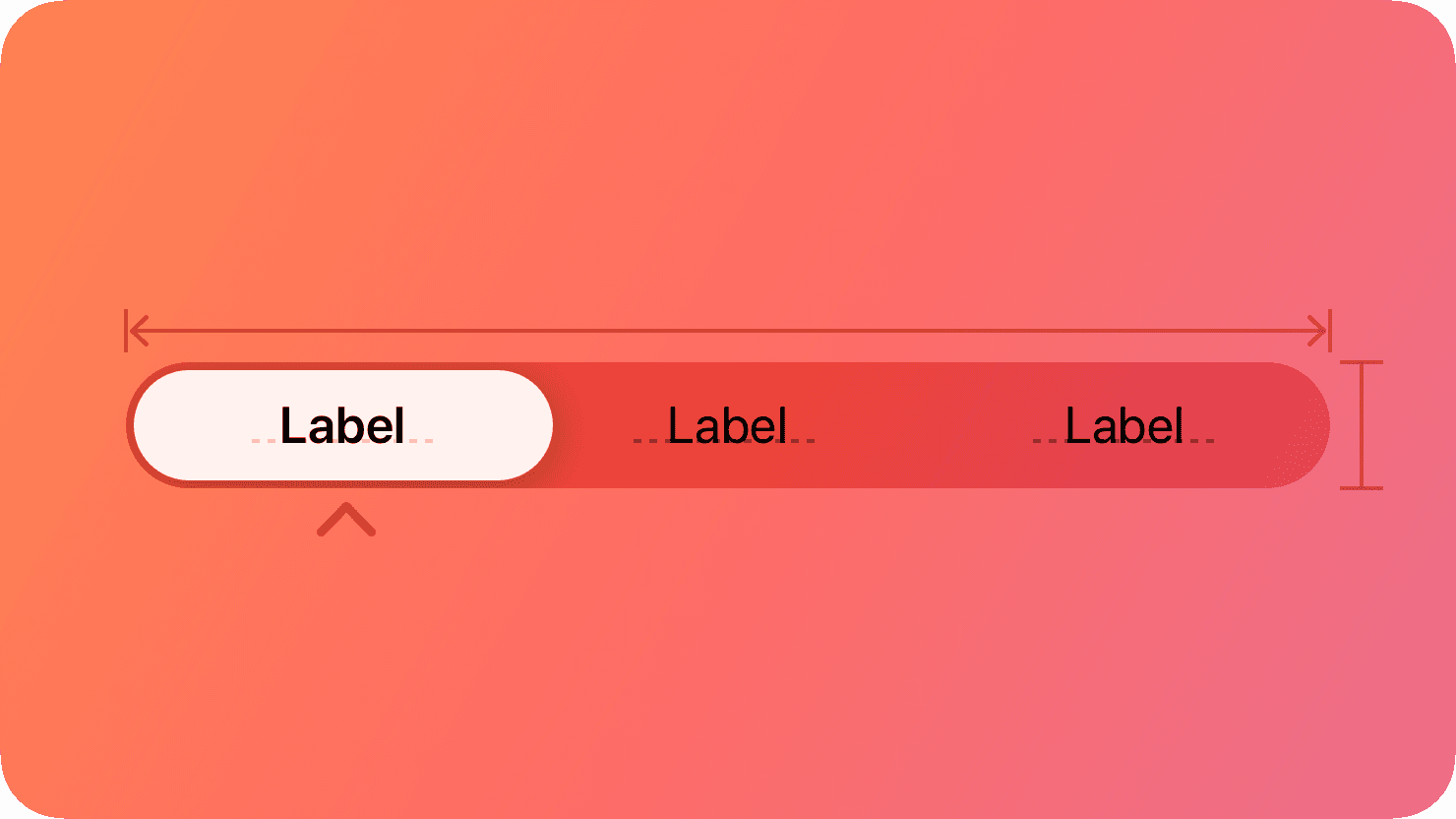
There are also components that, while visually distinct, behave the exact same way under the hood. Take for instance, the segmented control pictured from Apple's design system below. What primitive might this be under the hood? A single option can be active at a time, and there are a limited set of options visible. Essentially, the segmented control is a Radio Input with no dots visible.
Primitives should have both the style prop and className prop exposed as part of their API as it’s intended for folks to customize these components.
Unstyled doesn’t mean no styles
Sometimes primitives may ship with styles. A primitive that is positioned like a popover will need css in order to position itself on the page. This style is purely behavioral however and someone should not feel the need to go in and change this style positioning. Instead, the primitive should expose options to allow for developers to manipulate this behavior to say, appear on the right of the triggering element.
Sometimes styles can prevent common issues that can happen for a component. For instance, it’s an accessibility issue to nest clickable elements, but it’s extremely common for folks to do something like this:
<!-- DON'T DO THIS -->
<a href="/article" class="card">
  <h3>Title</h3>
  <p>Description</p>
  <a href="/author">John Doe</a>
</a>
This would create a violation of WCAG 4.1.2 which requires that interactive elements have clear controls and clear values. Because we’re nesting a link inside of another link, it becomes unclear to the assistive technology what to do when clicking on the nested link. Many linters will prevent this sort of violation, but you can also prevent this with css by blocking all nested pointer events:
.buttonPrimitive > * {
	pointer-events: none;
}
This will immediately show up for someone testing that the link does not work, and you should be guarded with linters blocking nested clickables.
It’s important though that primitives still do not do things like display: block on an anchor tag or try to normalize things. These styles should be purely behavioral and rely on the implementation of the component to ship with normalization or other styles.
Documentation of Primitives
Because a primitive is not shipping with styles, it’s important to include a checklist with each primitive that tells implementers what is needed to style the component accessibly. For example, a button will need focus styles implemented, an input will need a way to indicate visually that it’s in an error state, and a select dropdown will need a way to highlight the active option and non-color way to highlight the selected option.
There are also rules behind styling of components in general like the size of a button should be at least 24x24 pixels.
It’s possible to implement these checks using playwright testers, and that is something that is certainly useful to ship along with the primitives.
Styled Components
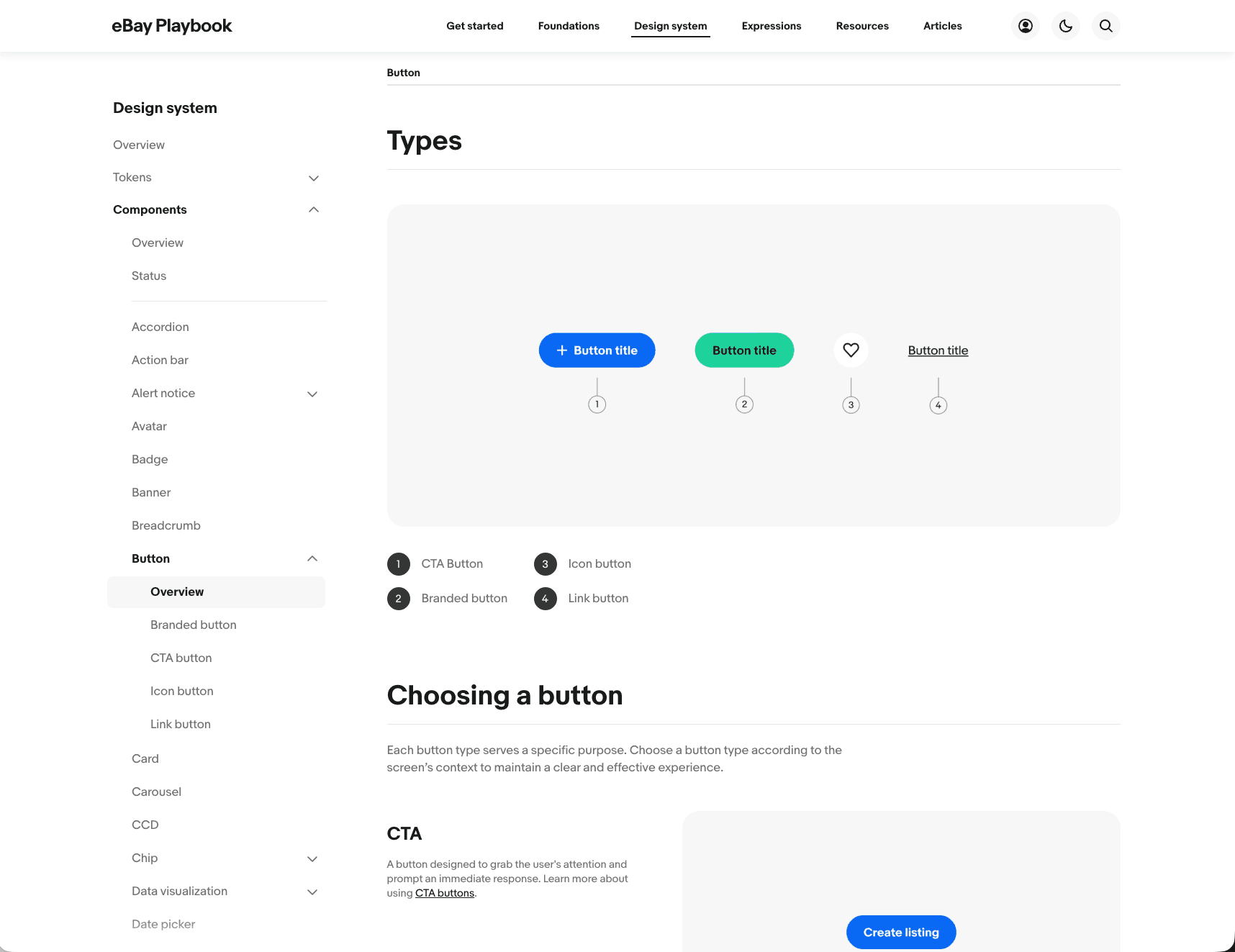
Styled components are the most opinionated part of this stack as it is fully styled and does not expose any class props or ways to override styles or behavior. There may be some functionality that is not locked down. For instance, a tooltip may have a way for developers to choose if it appears on top, left, bottom, or right side. But the distance from the tooltip to the anchor point, the styles of the tooltip, the behavior of what it does when there’s not enough room to open at that side, if an arrow appears pointing to the anchor point from the tooltip, all of these things would not be customizable.
Testing
A styled component should have a suite of interaction tests and screenshot tests. These screenshots tests should see all iterations that a styled component can be in: hover states, focus states, selected states, expanded states, etc. This should allow developers who are making changes to ensure that there are no visual side effects that are unexpected when making any changes. It’s also a good idea to ensure that the checklist that was included in the primitive is followed to ensure that it has accessible styling.
Documentation
Usually styled components are what is first presented in a design system’s documentation as it’s meant to be the first thing that folks reach for. This documentation is written out for both designers and developers to let them know when the component should be used, if a different component should be used instead for some situations, and what are best practices when using the component. For instance, if a button has a leading icon with semantic meaning, like a plus and the button label is “+ User” then the + needs alternative text to read “Add User”.
Not as extensible
A styled component should not ship or expose its styling. If a developer feels the need to copy existing styles from a styled component because they wish to detach, it should feel icky. Usually if they’re copying styles from a styled component it is a sign that they aren’t breaking away from the styled component enough to be justified. An example of this could be that they want an extra large button. Maybe there’s a justified use case to integrate that into the design system as a variant, or maybe this is a one-off that doesn’t really provide that much value. A styled design system exists to create consistency in the application and that is a really important experience. So friction existing to break away from the styled design system should exist. However, folks will always break away from a design system, even at the most disciplined companies. The primitives exist to give folks a better way to detach if they’re going to detach.
Why this approach works well
Most design systems could contain just styled components. For many places, this is sufficient and could even be most desired if trying to prevent deviations or detachment entirely. However, this creates problems when people need to build new features rapidly in new areas that can be unexpected.
Some components can also have internal logic to them that appears simple at first but is actually quite complex. For instance, a button could have tracking tools attached to it for metric logging or the ability to click on mouse down for custom selects or menus. These types of interactions can be quite complex to build. Clicking a button on mouse down for instance, requires a lock mechanism to ensure that onClick still works without clicking the control twice. By building these complex interactions in an unstyled interface, developers are able to trust that when styling a new instance the behaviors the design system ships with still exist.
The other great thing about folks pulling from primitive components is that we can create a code scanner to track when someone deviates. It’s almost impossible to find different “card” components in a codebase because it’s just styled divs. But if someone is always pulling from a card primitive then we can inspect why they felt the need to detach. Maybe our styled component was overly restrictive and we should expose a new option. Maybe this is a valid new variant. The key thing is that they were able to quickly build and design that new instance without having to wait for a design system engineer to go into the component, write a whole suite of screenshot tests, update variants, make sure it doesn’t create breaking changes, etc.